It's self hosting Sunday! What's up?
Let’s do another round of this. What’s going on on your servers, any cool things? How’d the recent CVE flood tangent you and did it change how you see/do stuff?
#selfhosted
914 posts · Last used 2h
NUC recommendations please
Looking to build/buy a headless Linux PC to #selfhost a few things including #pihole, #Nextcloud, media server, etc. Nothing that needs amazing compute power. Ideally small form factor like a NUC. This is replacing a Raspberry Pi 4 which I feel is underpowered and cumbersome with the 2.5" external drives separate or externally powered 3.5 inch drives. Ideally I’d be able to use the cheaper 3.5" drives on this setup without needing external power that requires.
I looked on local resale options and can’t seem to find anything available.
Thanks
[CBH] OpenFile: a static, self hostable file toolbox (PDF, images, video, OCR) with no backend
OpenFile is a static React and Vite app, so there is no backend to run and nothing to keep patched. Every tool uses WebAssembly or Web Workers in the visitor’s browser. The repo has a Dockerfile and it also works from any static host. I built it so I could stop trusting upload based converter sites. Live demo: openfile-studio.vercel.app . I am the author. I would like feedback on the self hosting setup and which tools are missing for your homelab workflow.
What should I replace the GTX 1080s in my server with?
As part of my Homelab, I have TrueNAS Community Edition running in a big case with a bunch of Frankenstein parts including two GTX 1080s. TrueNAS recently phased out support for these older cards and I’ve been having to go through and manually install working drivers, which seem to have gotten overwritten on the last update anyway. Since I’m not actually using anything for video output (and have onboard HDMI if needed). One of the cards I am passing through to a VM (where it has no problem being recognized and used). The other card was used by Truenas for my apps.
Do you have any recommendations for hardware to accelerate tasks like Immich, Jellfin transcoding, media fingerprinting for metadata, OCR on bulk-uploaded pdfs etc.?
I was never really a hardware guy, especially when it comes to self-hosting and servers.
I don’t want to play games on my server.
I don’t want to empty my accounts to put a 5090 TI in a server.
The above tasks are too slow on CPU alone, so I have to put something in it.
I could keep running the 1080s with manually installed drivers, but it’s a PITA and I wouldn’t mind not doing that.
Are there reasonable options that can take up the workload, but come in at a decent price point? I know with a server, I don’t necessarily have to run the same stuff as gamers. Are there options outside of the typical NVIDIA and AMD gaming linups that would work for my purpose, perhaps acquirable via FB marketplace, Craigslist, etc.? Does your server have video acceleration and, if so, what hardware are you using?
I appreciate any guidance the community can give me.

Boosted by @welcome@friends.deko.cloud
Hi Mastodon! I'm Ahmet, a developer from Türkiye.
The operating system vulnerabilities of the past months made me want
to build a safer Linux distribution and raise awareness about
hardening. That became SedirOS, a hardened Debian-based server distro.
1.0 shipped this week.
I'm here to get feedback and find out what's still missing.
#introduction #linux #debian #infosec #selfhosted
This is not creepy, but I enjoy handing candy out to children
Halloween is the one night of the year that I get to hand candy out to children, who I do not know and it is socially acceptable. So tonight is the night I get to do it!
I have also gotten into the hobby of Homelabbing, so it is Halloween and I could not figure out why my Ring light was not staying on. Home Assistant could not turn it on nothing, I was spinning the gears in my head what was not working? I looked at it and I saw the little blue light flashing, I thought that was weird why is it flashing. I found my phone and went into the Ring app and it was saying it could not find the light? Then I thought well I will just need to maybe turn it off and on again, nope the blue light just kept flashing. So than I thought I would just reset it and make it join wifi again, when I turned it on into pairing mode I remembered that I had yet to give it access to my IoT wifi network. So it had been working on its schedule and motion detection with no way of telling me anything and I did not realize this over sight until today. So always remember that you need to get everything to rejoin your wifi if you make changes, like adding a IoT subnet!
On top of that I was panicking that I could not find the wifi code in the stupid theme I have on OpenWRT, luckily there is a command for that “cat /etc/config/wireless” entered that and I could get the password easy peasy.
Mounting Truenas datsets on Proxmox
I have Truenas Scale as a file repository. Then Proxmox on seperate machine but same network.
On Proxmox I have VM withe several services. Some of these store several GBs of data so i would lime to mount datasets to Proxmox. What is the best wat of doing this? Mount a single nfs share to proxmox and the mount this share in the vm or should i mount the truenas daraset directly in the vm? The latter semms simpler? My.main cincern is avoiding disasters on services, vm and proxmox il nas goes offline for whatever reason. Is there a way to deal with this risk?

Boosted by @welcome@friends.deko.cloud
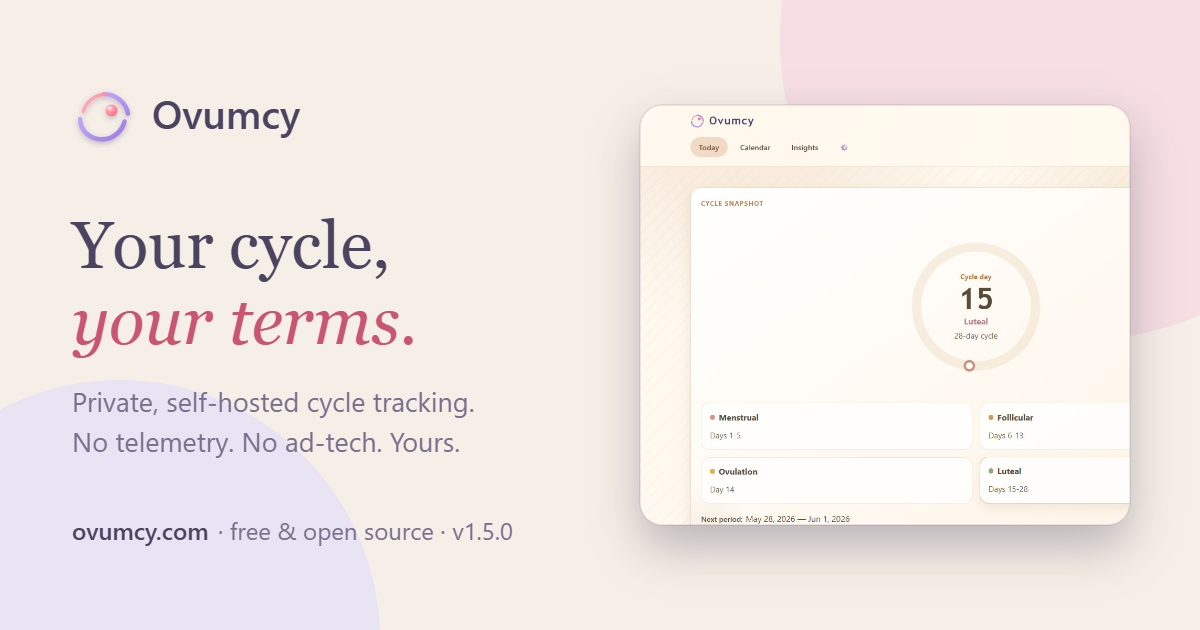
Hi, fediverse! We're Ovumcy, a menstrual cycle tracker you run yourself.
Your period dates, symptoms and fertile-window estimates stay on your own server, not in someone else's cloud. One Go binary or container, SQLite or PostgreSQL, no vendor account, no analytics, no telemetry, CSV and JSON export anytime. Open source, AGPL-3.0.
Predictions are estimates, not medical advice.
https://ovumcy.com
https://github.com/ovumcy/ovumcy-web
#introduction #selfhosted #privacy #FOSS #periodtracker

Linux Kernel TCP Flaw With 9.8 CVSS Score Affects Ubuntu, Red Hat and Other Distributions
Every Go application since 1.24 will activate MPTCP on their sockets by default.
And I’ve read that this includes Syncthing, which is why I’m posting this here

Help an idiot protect his homelab and few services exposed to the internet.
Hi all,
I am running proxmox on a mini PC with a handful of services in my stack. I also run NPM in an LXC to reach my services through my domain name (service.domain.tld).
For my Arr related stuff, I use Usenet, and everything runs through a VPN.
I have three services which are public. Jellyfin, Seer and BookOrbit (for syncing Kobos).
Currently I have no security besides the built in login managers from the services, but I am considering setting up Authentik. I know I’m asking for trouble with my current set up.
I have elderly and extremely tech averse family members who live in two countries other than me, so tech support can be a challenge.
A lot of people suggest running a VPN, but it would be difficult for my family and I don’t know how to make it work syncing our Kobos with BookOrbit.
I’ve also seen some posts about tunneling to a VPS somewhere and users can connect to the VPS without a VPN.
I feel this question has been asked several times, and I tried searching here and on the internet in general, but my knowledge is not good enough to use the right terms and to get something that is idiot proof.
Any suggestions on best practices or links to guides you recommend would be much appreciated. Also, what EU based affordable VPS would you recommend?

It's #FairtradeMusicFriday! Here's a new submission thread for November.
Submit your own release or someone else's, it can be by #FediMusicians or not.
It should be hosted on an open platform like #Faircamp, #JamCoop, #Mirlo or #SelfHosted, or on a platform fair to artists like #Bandcamp or #Subvert. As long as it is by an #IndieArtist - it doesn't even need to be new.
Just make a direct public comment (with a link & description) to this post and it will appear at https://isitfairtrademusicfri.day automagically!
Buying or boosting will make an artist's day 💙



How much pain should I expect upgrading my server from Debian 12 to 13?
The insidious urge to fix what ain’t broke has arisen. I’ll probably follow the official documentation, unless someone has a better suggestion.
I’m not running anything unusual and I haven’t done much, if any, “customization”. I update packages maybe a couple of times a week, so they’re current.
Should I go ahead and put myself through this now, or wait until support is dropped and I’m forced?
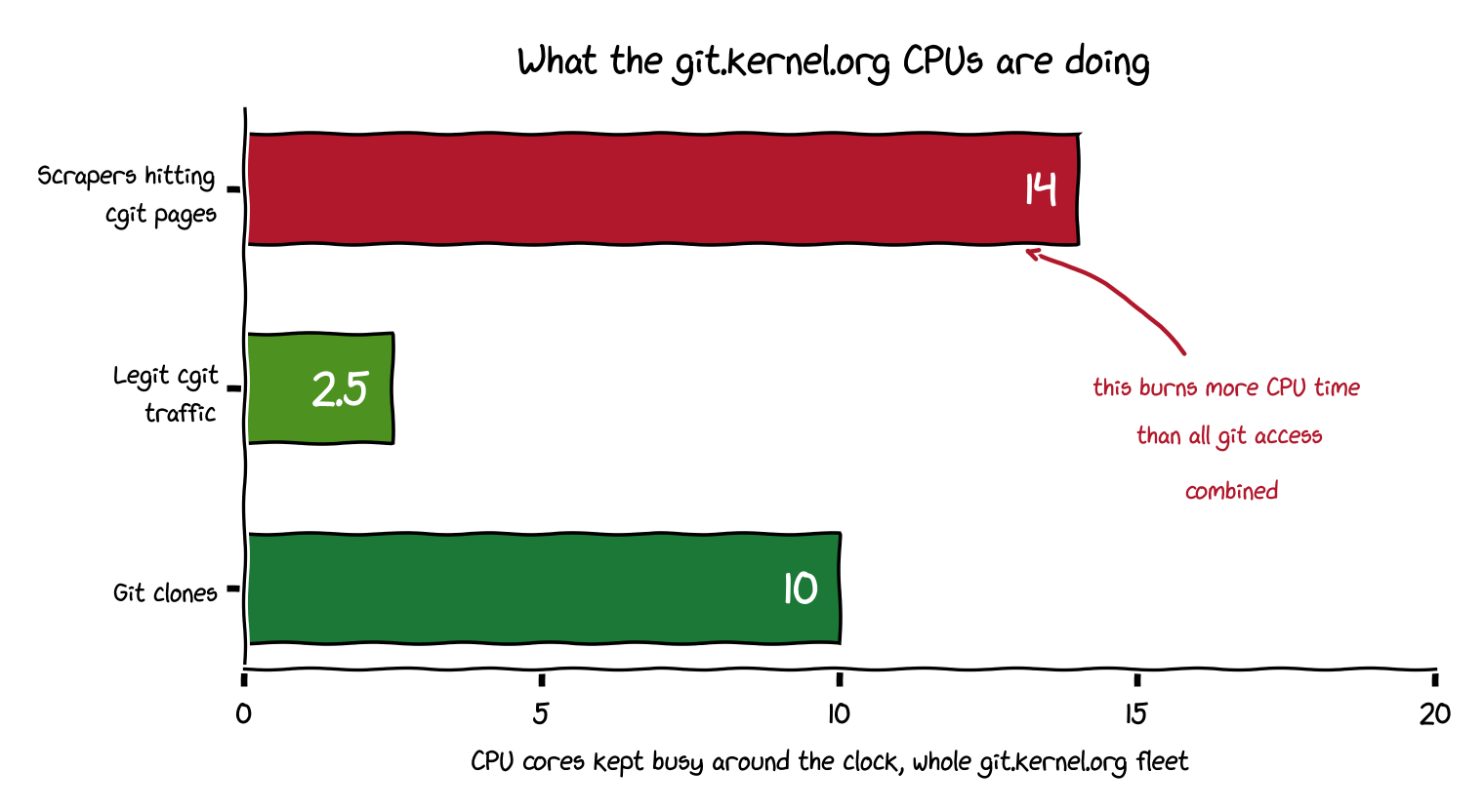
[AIT] Creepy crawlies (AI crawlers on git.kernel.org)
Cross posted from: lemmy.world/post/53750210
Looking for a tool for browsing contents of unmounted cold storage
Hello everyone, I’m in the process of setting up long term storage of a large amount of media files for my family. Since this is stuff that’s rarely accessed, I don’t need it to be always fully available, and I want to limit the actual transfer of files to a specific schedule.
Since knowing what’s already in storage is kinda non-trivial, are there any tools out there that allow me to browse which files are in cold storage, without the actual drives being attached / mounted? So only info like file location, name, metadata, perhaps icon, etc.
The transfer part I can manage to automate, as I can think of a few ways of allowing my users to “stage” pulling and pushing info from and to cold storage, and having the transfers be done on a fixed schedule like every two weeks or something.
Obviously self-hosted, open source stuff that’s not vibecoded is preferred.
Thanks in advance!
[AIP] Stalwart v1.0: The Fastest Mail Server on the Planet


Is webmin safe to have accesible over the web
As the title says ive started running webmin. And i wanna know if its safe for me to reverse proxy (with 2fa) or should i just use tailscale or ssh to access it.

Self-hosting redlib?
Hey all,
I use redlib instead of reddit for the info I still need to access on that platform. Recently, and with the API changes, the existing public instances being unreliabile cause of that I was maybe looking to host an instance myself.
I don’t know if I wanna keep it private or not but in the scenario that I do make it a public instance, how would I manage this?
Is it a good idea to host this in my home, cause I have a residential IP. I dont want to get that banned by reddit, so residential proxies? I assume a random VPN would be blocked. Also what about bot protection? Anubis and crowdsec? What specs would be needed for such an instance?
Thank you!
Edit 30/10: well I guess if reddit is going to be requiring logins I’ll just go pound sand 😢
OIDC Recommendations?
Looking to setup OIDC…is there a recommended provider on the Fediverse?
Give me your recommendations!
Edit: Thanks everyone. I landed on PocketID for it’s simplicity. Quick and easy to setup!
GameVault 2 leaves Early Access and runs on Linux
Hey c/selfhosted,
In my last post here, I introduced the Web UI and said it would become the foundation for a cross-platform desktop client. Quite a few of you were waiting for a Linux application. I’m really happy to finally be back with one: GameVault 2 is now available to everyone as a public beta!
For anyone coming across it for the first time, GameVault is a self-hosted platform for managing your own DRM-free game collection. Your server holds the library, and the desktop client downloads and installs games so you can play them locally and share your collection with friends and family.
The new desktop app runs on Linux, Windows and macOS. On Linux, we provide AppImage and .deb packages, and Windows games can run through umu-launcher with Wine/Proton. Each game gets its own prefix.
We’ve also rebuilt the interface around the frontend we started with the Web UI. It’s a huge visual improvement over the old client, and it’s responsive, so the layout adapts when you’re browsing on a phone or using a smaller window. The browser and desktop app share the same interface. You can now keep multiple versions of a game in your vault and pick the version you want to download, too.
When we first shared GameVault here, it was a small project built with the technology we knew. A lot has changed since then. We’re still two developers, and being able to come back here with the Linux client people asked for means a lot to me. I’m proud of this release.
There are still rough edges: GameVault 2 is a public beta, GameVault+ features are still missing, and games installed through GameVault 1 need to be downloaded and installed again. The old client remains available while we work on the missing functionality and stability.
Thanks to everyone who stuck around, tested builds or gave us feedback. We’ve already moved to GameVault 2 ourselves, and I’m excited for more of you to try it.
Download GameVault 2, and please report any bugs you find.

what is a good self hostable alternative to facebook messenger
just asking what is a good one